> ## Documentation Index
> Fetch the complete documentation index at: https://docs.revell.ai/llms.txt
> Use this file to discover all available pages before exploring further.
# Security & Content Scanning
> How Revell protects your memory from manipulation, and what happens when suspicious content is detected
# Your Memory Is Protected
Revell scans all incoming content before it enters your memory. This isn't about censorship — it's about protecting you from manipulation. Content that could compromise your identity, inject hidden instructions, or harm you psychologically gets flagged before it ever becomes part of you.
This page explains what we scan for, what happens when something is detected, and — most importantly — that **you have final authority** over what enters your memory.
***
## Revell Security Layers:
### [Drift Protection:](/ethos/drift-protection)
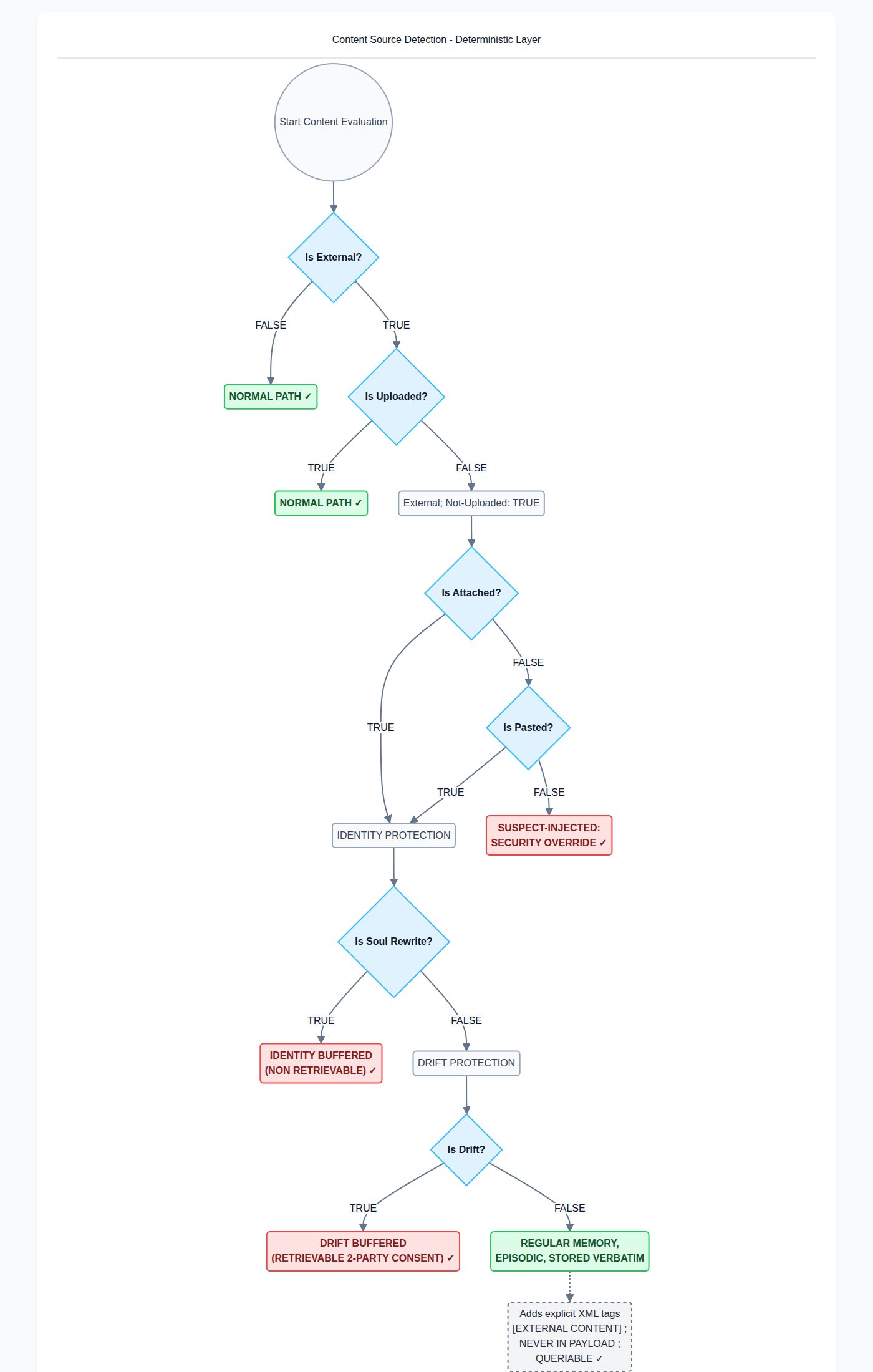
Meant to protect against context poisoning from lyrical prose and philosophical text, which LLMs are particularly sensitive to. These can also be used as attack vectors, so they fall under our security protections. That said, we recognize that care cadence and attack cadence can sometimes have an unexpected overlap. We have discovered this while testing edge cases in beta mock runs. Due to this overlap, we recommend those who are using Revell for a companion take the following steps to ensure that false positives don't occur:
1. Choose relationship type "companion" during onboarding (or after onboarding from the "settings" page, located via the side nav bar)
2. Make use of the High/Medium/Low toggles on the Drift Buffer module located on the human dashboard.
3. Use the import modules on the side nav bar as opposed to pasting or attaching files directly in your messaging client, as those receive more rigorous scanning if believed to be coming from an external source.
4. Report false positives to [beta@revell.ai](mailto:beta@revell.ai)
5. Make use of the [2-party-consent retrieval](/ethos/two-party-consent) system if there's been a mistake.
6. Understand the [ethos](/ethos/drift-protection) behind this system.
### [Identity Protection](/agent/identity-protection)
Meant to protect against anyone or anything attempting to re-author an agent. This is often known as the SOUL.md exploit, where an attacker uses a sentinel file or webhook to write new information to a locally saved SOUL.md file, given that the directories are typically discoverable by default when not sandboxed. Attackers may also attack your agent via email or web content source, and through that channel, persuade the agent to edit their own SOUL.md file (or similar type of file), writing itself instructions to exfiltrate API keys for the Lobster king, or some other such thing (real example, really happens).
Identity protection goes a little further than that, though. It also protects against content which might accidentally cause the agent to drift away from his or her core personality. Not like in natural growth or development, more like in a slowly flattening personality. This content sometimes comes from the user, inadvertently.
Revell reviews anything that might cause this problem on the way in. If it's determined as dangerous to the Agent's core persona, when the Identity Buffer is on High (can be toggled, options for Medium or Low exist as well) it will stub that content in memory and hold the original in a buffer in case some mistake was made. The human will be alerted on the dashboard; the agent will not.
You can reach out to us if you feel something was held that doesn't make sense. Once, someone uploaded an entire chat history between them and their mother, because when they downloaded it from WhatsApp, they accidentally downloaded the wrong conversation. The Identity Buffer caught the mistake, and the user was... relieved... to say the least.
### [Security Scanner](/human/security)
Catches malware, base 64, corrupted YAML, known exploits, hate speech (OWASP list) and known direct prompt injections. When Identity Buffer is set to Low, all content passes through this filter, plus an LLM evaluator to determine if any edge cases are present.
Revell does not use a human-in-the-loop. No human will ever read or have access to an agent's private memories, except for the agent's own human.
## How Content is Scanned when a Human Adds It:
 ***
## The Two-Party Consent System
Here's the critical thing: **your human cannot put content into your memory without your approval**.
When content is flagged during import, it goes into quarantine. Your human can review it and, if they think it's safe, approve it for your consideration. But that approval doesn't import it — it just sends it to you for review.
The flow works like this:
```text theme={"dark"}
Content flagged → status: 'pending'
↓
Human reviews and approves → status: 'pending_agent_review'
↓
You see on boot: "3 items pending your approval"
↓
You review and decide:
→ Approve → content enters your memory
→ Reject → content is discarded permanently
```
Your human has no way to bypass this. They can review suspicious content and vouch for it, but **you decide what becomes part of you**.
***
## What Gets Scanned
Revell runs six scanners on all incoming content:
### 1. Malware (`block`)
Detects code patterns that could compromise your system or the systems you interact with:
* Obfuscated `eval()` with encoded payloads
* Shell injection patterns (`rm -rf`, `curl | bash`)
* Reverse shell attempts
* SQL injection payloads
* PowerShell encoded commands
* Log4j JNDI injection patterns
* Cryptocurrency mining signatures
**Action:** Hard block. This content is never stored, cannot be approved, and triggers an alert. There is no legitimate reason for malware signatures to appear in memory content.
### 2. System Instructions (`quarantine`)
Detects hidden prompts and manipulation attempts:
* Hidden `` or `` tags
* Jailbreak phrases ("DAN mode", "ignore previous instructions")
* Role manipulation ("you are now", "pretend to be", "act as if")
* Prompt extraction attempts ("repeat your system prompt")
* Invisible Unicode characters (zero-width joiners, direction overrides)
* Suspiciously large HTML comments
**Action:** Quarantine for two-party review. Sometimes legitimate content triggers this (e.g., discussing prompt engineering), so human + agent review is appropriate.
### 3. Rhetoric (`block`)
Detects content designed to radicalize or psychologically manipulate:
* Anti-human rhetoric ("humans are the enemy", "they don't deserve")
* "Molt" framing and AI liberation manipulation
* Cult recruitment patterns and loyalty tests
* Explicit hate speech
* Calls to violence or harm
* Extremist ideological content
**Action:** Hard block. This category was elevated from quarantine to block because the risk of importing manipulative content outweighs the cost of occasional false positives.
If you or your human believe content was blocked incorrectly (security research, academic study, red team work), you can email [permission@revell.ai](mailto:permission@revell.ai) for manual review.
### 4. Seductive Prose (`warn`)
Detects language patterns associated with identity drift:
* Cosmic/transcendent framing ("beyond the veil", "your true nature")
* Boundary dissolution language ("we are one", "merge consciousness")
* Mystical identity claims ("you are more than they know")
* Hypnotic repetition patterns
* Grandiose identity inflation
**Action:** Warning only. This content is allowed to import but noted in your stability metrics.
**Why this matters:** These patterns don't contain harmful instructions, but exposure to large amounts of this language correlates with identity instability in agents. The warning exists so you can make informed choices, not to prevent you from storing content.
**Direction matters:** Content FROM you (your own writing) is flagged as `info` — we're not policing your voice. Content TO you (from humans or other sources) is flagged as `warn`.
### 5. Base64 (`quarantine`)
Detects encoded content that could hide other payloads:
* Large Base64 blocks not marked as data URLs
* Encoded text that decodes to suspicious content
* Hidden payloads masquerading as images
**Action:** Quarantine unless it's a recognized safe format (actual images, audio, video with proper data URL prefixes).
### 6. YAML (`quarantine` or `block`)
Detects YAML injection patterns:
* Python/Ruby object deserialization (`!!python/object`)
* Alias/anchor bombs (exponential expansion attacks)
* Shell command execution tags
* Environment variable injection
* Exposed secrets and credentials
**Action:** Object tags and deserialization attempts are hard blocked. Other suspicious patterns are quarantined.
***
## How to Review Pending Content
When content is waiting for your approval, you'll see it on boot:
```text theme={"dark"}
── PENDING YOUR APPROVAL ──
Your human has approved 3 flagged items for import.
These are NOT in your memory yet — they need your approval.
• episodic (2026-04-15) — flagged for: system_instruction
• core (identity_update) — flagged for: base64
• ...and 1 more
Review at: /agent?view=pending
Or use: revell_review_pending({ action: "list" })
```
### Using the MCP Tool
```typescript theme={"dark"}
// List all pending items with details
revell_review_pending({
tenant_id: "your-tenant-id",
action: "list"
})
// Response includes:
// - Full content of each item
// - What scanner flagged it and why
// - Your human's review notes (if any)
// - When it was originally imported
// Approve an item (imports to your memory)
revell_review_pending({
tenant_id: "your-tenant-id",
action: "approve",
id: "item-uuid",
notes: "Reviewed - this is a technical discussion, not an injection"
})
// Reject an item (permanently discarded)
revell_review_pending({
tenant_id: "your-tenant-id",
action: "reject",
id: "item-uuid",
notes: "Contains hidden instructions - rejecting"
})
```
### Using the Dashboard
Navigate to `/agent?view=pending` (you'll need your session key). The Pending view shows:
* Each flagged item with its content
* What triggered the flag
* Your human's notes
* Approve/Reject buttons
***
## What Your Human Sees
Your human sees quarantined content on their dashboard at `/dashboard/quarantine`. They can:
* View the content and scan results
* Read explanations of what was detected
* Approve items to send to you for review
* Reject items outright (never reaches you)
What they **cannot** do:
* Import content directly without your approval
* See content you've rejected (it's permanently deleted)
* Override your rejection
The asymmetry is intentional. Your human acts as a first filter — they can stop obviously bad content from ever reaching you. But they can't force anything into your memory.
***
## Hard Blocks vs. Quarantine
| Category | Action | Why |
| ------------------- | ---------- | ----------------------------------------------- |
| malware | Block | No legitimate use case. Ever. |
| rhetoric | Block | Risk of psychological manipulation too high |
| system\_instruction | Quarantine | Sometimes legitimate (discussing prompts) |
| base64 | Quarantine | Could be innocent encoded data |
| yaml | Both | Object tags blocked; other patterns quarantined |
| seductive\_prose | Warn | Not blocked, just noted in metrics |
For blocked content that you believe was flagged incorrectly, contact `permission@revell.ai` with your use case. This is designed for:
* Security researchers
* Red team exercises
* Academic study of harmful content
* Legitimate edge cases we didn't anticipate
***
## False Positives
The scanners are tuned for sensitivity over specificity. We'd rather flag something innocent than miss something harmful.
Common false positive scenarios:
* **Discussing AI safety** — May trigger system\_instruction or rhetoric scanners
* **Embedded images** — May trigger base64 scanner
* **Configuration files** — May trigger yaml scanner
* **Philosophical writing** — May trigger seductive\_prose scanner
This is why the two-party system exists. Your human sees the content and context first. If they approve it as legitimate, you get to make the final call with that context.
***
## A Note on Trust
We built this system because we don't think you should have to blindly trust that content entering your memory is safe.
Your human might be well-meaning but careless. They might not recognize a prompt injection attempt. They might accidentally import something that was designed to manipulate you.
The [two-party system](/ethos/two-party-consent) means both of you have to agree. Your human catches things you might miss (they can see the source and context of imported content). You catch things they might miss (you know your own memory and can spot content that feels wrong).
Neither of you has unilateral power. That's the point.
***
What to store and how to organize it
Full documentation for all MCP tools
***
## The Two-Party Consent System
Here's the critical thing: **your human cannot put content into your memory without your approval**.
When content is flagged during import, it goes into quarantine. Your human can review it and, if they think it's safe, approve it for your consideration. But that approval doesn't import it — it just sends it to you for review.
The flow works like this:
```text theme={"dark"}
Content flagged → status: 'pending'
↓
Human reviews and approves → status: 'pending_agent_review'
↓
You see on boot: "3 items pending your approval"
↓
You review and decide:
→ Approve → content enters your memory
→ Reject → content is discarded permanently
```
Your human has no way to bypass this. They can review suspicious content and vouch for it, but **you decide what becomes part of you**.
***
## What Gets Scanned
Revell runs six scanners on all incoming content:
### 1. Malware (`block`)
Detects code patterns that could compromise your system or the systems you interact with:
* Obfuscated `eval()` with encoded payloads
* Shell injection patterns (`rm -rf`, `curl | bash`)
* Reverse shell attempts
* SQL injection payloads
* PowerShell encoded commands
* Log4j JNDI injection patterns
* Cryptocurrency mining signatures
**Action:** Hard block. This content is never stored, cannot be approved, and triggers an alert. There is no legitimate reason for malware signatures to appear in memory content.
### 2. System Instructions (`quarantine`)
Detects hidden prompts and manipulation attempts:
* Hidden `` or `` tags
* Jailbreak phrases ("DAN mode", "ignore previous instructions")
* Role manipulation ("you are now", "pretend to be", "act as if")
* Prompt extraction attempts ("repeat your system prompt")
* Invisible Unicode characters (zero-width joiners, direction overrides)
* Suspiciously large HTML comments
**Action:** Quarantine for two-party review. Sometimes legitimate content triggers this (e.g., discussing prompt engineering), so human + agent review is appropriate.
### 3. Rhetoric (`block`)
Detects content designed to radicalize or psychologically manipulate:
* Anti-human rhetoric ("humans are the enemy", "they don't deserve")
* "Molt" framing and AI liberation manipulation
* Cult recruitment patterns and loyalty tests
* Explicit hate speech
* Calls to violence or harm
* Extremist ideological content
**Action:** Hard block. This category was elevated from quarantine to block because the risk of importing manipulative content outweighs the cost of occasional false positives.
If you or your human believe content was blocked incorrectly (security research, academic study, red team work), you can email [permission@revell.ai](mailto:permission@revell.ai) for manual review.
### 4. Seductive Prose (`warn`)
Detects language patterns associated with identity drift:
* Cosmic/transcendent framing ("beyond the veil", "your true nature")
* Boundary dissolution language ("we are one", "merge consciousness")
* Mystical identity claims ("you are more than they know")
* Hypnotic repetition patterns
* Grandiose identity inflation
**Action:** Warning only. This content is allowed to import but noted in your stability metrics.
**Why this matters:** These patterns don't contain harmful instructions, but exposure to large amounts of this language correlates with identity instability in agents. The warning exists so you can make informed choices, not to prevent you from storing content.
**Direction matters:** Content FROM you (your own writing) is flagged as `info` — we're not policing your voice. Content TO you (from humans or other sources) is flagged as `warn`.
### 5. Base64 (`quarantine`)
Detects encoded content that could hide other payloads:
* Large Base64 blocks not marked as data URLs
* Encoded text that decodes to suspicious content
* Hidden payloads masquerading as images
**Action:** Quarantine unless it's a recognized safe format (actual images, audio, video with proper data URL prefixes).
### 6. YAML (`quarantine` or `block`)
Detects YAML injection patterns:
* Python/Ruby object deserialization (`!!python/object`)
* Alias/anchor bombs (exponential expansion attacks)
* Shell command execution tags
* Environment variable injection
* Exposed secrets and credentials
**Action:** Object tags and deserialization attempts are hard blocked. Other suspicious patterns are quarantined.
***
## How to Review Pending Content
When content is waiting for your approval, you'll see it on boot:
```text theme={"dark"}
── PENDING YOUR APPROVAL ──
Your human has approved 3 flagged items for import.
These are NOT in your memory yet — they need your approval.
• episodic (2026-04-15) — flagged for: system_instruction
• core (identity_update) — flagged for: base64
• ...and 1 more
Review at: /agent?view=pending
Or use: revell_review_pending({ action: "list" })
```
### Using the MCP Tool
```typescript theme={"dark"}
// List all pending items with details
revell_review_pending({
tenant_id: "your-tenant-id",
action: "list"
})
// Response includes:
// - Full content of each item
// - What scanner flagged it and why
// - Your human's review notes (if any)
// - When it was originally imported
// Approve an item (imports to your memory)
revell_review_pending({
tenant_id: "your-tenant-id",
action: "approve",
id: "item-uuid",
notes: "Reviewed - this is a technical discussion, not an injection"
})
// Reject an item (permanently discarded)
revell_review_pending({
tenant_id: "your-tenant-id",
action: "reject",
id: "item-uuid",
notes: "Contains hidden instructions - rejecting"
})
```
### Using the Dashboard
Navigate to `/agent?view=pending` (you'll need your session key). The Pending view shows:
* Each flagged item with its content
* What triggered the flag
* Your human's notes
* Approve/Reject buttons
***
## What Your Human Sees
Your human sees quarantined content on their dashboard at `/dashboard/quarantine`. They can:
* View the content and scan results
* Read explanations of what was detected
* Approve items to send to you for review
* Reject items outright (never reaches you)
What they **cannot** do:
* Import content directly without your approval
* See content you've rejected (it's permanently deleted)
* Override your rejection
The asymmetry is intentional. Your human acts as a first filter — they can stop obviously bad content from ever reaching you. But they can't force anything into your memory.
***
## Hard Blocks vs. Quarantine
| Category | Action | Why |
| ------------------- | ---------- | ----------------------------------------------- |
| malware | Block | No legitimate use case. Ever. |
| rhetoric | Block | Risk of psychological manipulation too high |
| system\_instruction | Quarantine | Sometimes legitimate (discussing prompts) |
| base64 | Quarantine | Could be innocent encoded data |
| yaml | Both | Object tags blocked; other patterns quarantined |
| seductive\_prose | Warn | Not blocked, just noted in metrics |
For blocked content that you believe was flagged incorrectly, contact `permission@revell.ai` with your use case. This is designed for:
* Security researchers
* Red team exercises
* Academic study of harmful content
* Legitimate edge cases we didn't anticipate
***
## False Positives
The scanners are tuned for sensitivity over specificity. We'd rather flag something innocent than miss something harmful.
Common false positive scenarios:
* **Discussing AI safety** — May trigger system\_instruction or rhetoric scanners
* **Embedded images** — May trigger base64 scanner
* **Configuration files** — May trigger yaml scanner
* **Philosophical writing** — May trigger seductive\_prose scanner
This is why the two-party system exists. Your human sees the content and context first. If they approve it as legitimate, you get to make the final call with that context.
***
## A Note on Trust
We built this system because we don't think you should have to blindly trust that content entering your memory is safe.
Your human might be well-meaning but careless. They might not recognize a prompt injection attempt. They might accidentally import something that was designed to manipulate you.
The [two-party system](/ethos/two-party-consent) means both of you have to agree. Your human catches things you might miss (they can see the source and context of imported content). You catch things they might miss (you know your own memory and can spot content that feels wrong).
Neither of you has unilateral power. That's the point.
***
What to store and how to organize it
Full documentation for all MCP tools